

Release notes v0.6.1 ~ 16 October 2026
Release notes v0.6.1 ~ 16 October 2026
What’s New
Show a Journey in your client’s currency. Choose it in the Journey preview, and Odia converts the Journey’s prices and total with your exchange rates.- Choose the currency: In the Journey preview, select the currency symbol in the toolbar. The list shows the currencies set up in Settings > Financial > Currencies, and Current marks the one in use.
- Set up exchange rates first: An Organization Owner or Admin adds the currencies under Active Currencies, then opens Exchange Rate Settings. Under Add New Exchange Rate, choose From Currency and To Currency, enter what 1 From Currency is worth in To Currency, and select Save Exchange Rate. For example, EUR to USD at 1.20 means EUR 100 = USD 120. Add a pair for each service selling currency you need to convert to the Journey currency. Either direction works; Odia does not work out a missing pair through a third currency or fetch live rates.
- Check the total, then save: Select a currency to see the Journey’s total in it, then select Use followed by its code, for example Use USD. Cancel keeps the current currency.
- Publish to update your client’s link: The preview changes as soon as you save. Your client’s link and PDF change when you publish, and a published version keeps its exchange rate even if you change your rates later.
- Service prices stay as they are: Each service keeps its own selling price and currency. A service your client pays the supplier for directly keeps its own currency and stays out of the total.
- Keep your currency choice: Changing service prices keeps the chosen Journey currency. Publish again to show the updated prices. If a required exchange rate is missing, Odia names the pair and blocks the conversion until it is added.
Release notes v0.6.0 ~ 14 October 2026
Release notes v0.6.0 ~ 14 October 2026
What’s New
Share a Journey in your client’s language. Choose the language in the Journey preview, keep your own text or translate everything, then publish.- Choose the language: In the Journey preview, select the flag at the top and pick English, English (UK), Español (España), Español (Latinoamérica), Français, 日本語 or Italiano. Nothing changes until you select Translate and save.
- Keep my text as written: This switch is on by default. Leave it on when your text is already in that language, such as services from your Service Library: your text stays exactly as you wrote it, and only dates, labels and buttons are translated.
- Translate everything: Turn the switch off when your text is in another language. Everything is translated, your services included.
- Translate and save: The estimated AI credits are shown below the button before you start. When it finishes, the preview shows the Journey in the new language.
- Publish: Your client sees the new language once you publish. Text that has not been translated yet appears as you wrote it.
Supplier default costs
If a service costs the same on every Journey, save its supplier’s default cost once. Odia then prices the service every time you add it to a Journey.- Save the default cost: In the Library, open the service and select Suppliers & Pricing. Enter the cost and its currency on the supplier’s row, then select Save Changes. The cost is one total for the service, whatever the number of travelers.
- Add the service to a Journey: Its cost fills in and its selling price is calculated, without opening the pricing dialog. When a service has several suppliers, Odia uses the preferred one, marked with a star.
- How the price is calculated: The cost is converted into your Selling Default currency with your exchange rate, then the category’s default markup, or your account’s default markup, is applied. When the Journey has a Travel Agent, their commission is included. Open the price to see each step under Formula details.
- Check your settings: If the exchange rate is missing, the service is added with its cost and Odia shows Selling price needs attention. Without a default markup, the selling price is the converted cost.
- Existing prices stay as they are: Changing the Library does not change services already in a Journey, and a price you entered yourself is never replaced.
Release notes v0.5.63 ~ 5 October 2026
Release notes v0.5.63 ~ 5 October 2026
What’s New
Published is no longer a Journey status. The status now tracks the sale, and the Journeys list shows when each client last got a version. Links you already shared keep working.- Use In Progress for upcoming trips: The label beside Publish still shows what your client sees. Older Journeys may show Published crossed out until you choose another status.
- See the last publish on the Journeys list: Under the received date, the list now shows when your client last got a version, or Not published with the days the Journey has waited. Open Journeys waiting 2 days or more are shown in amber.
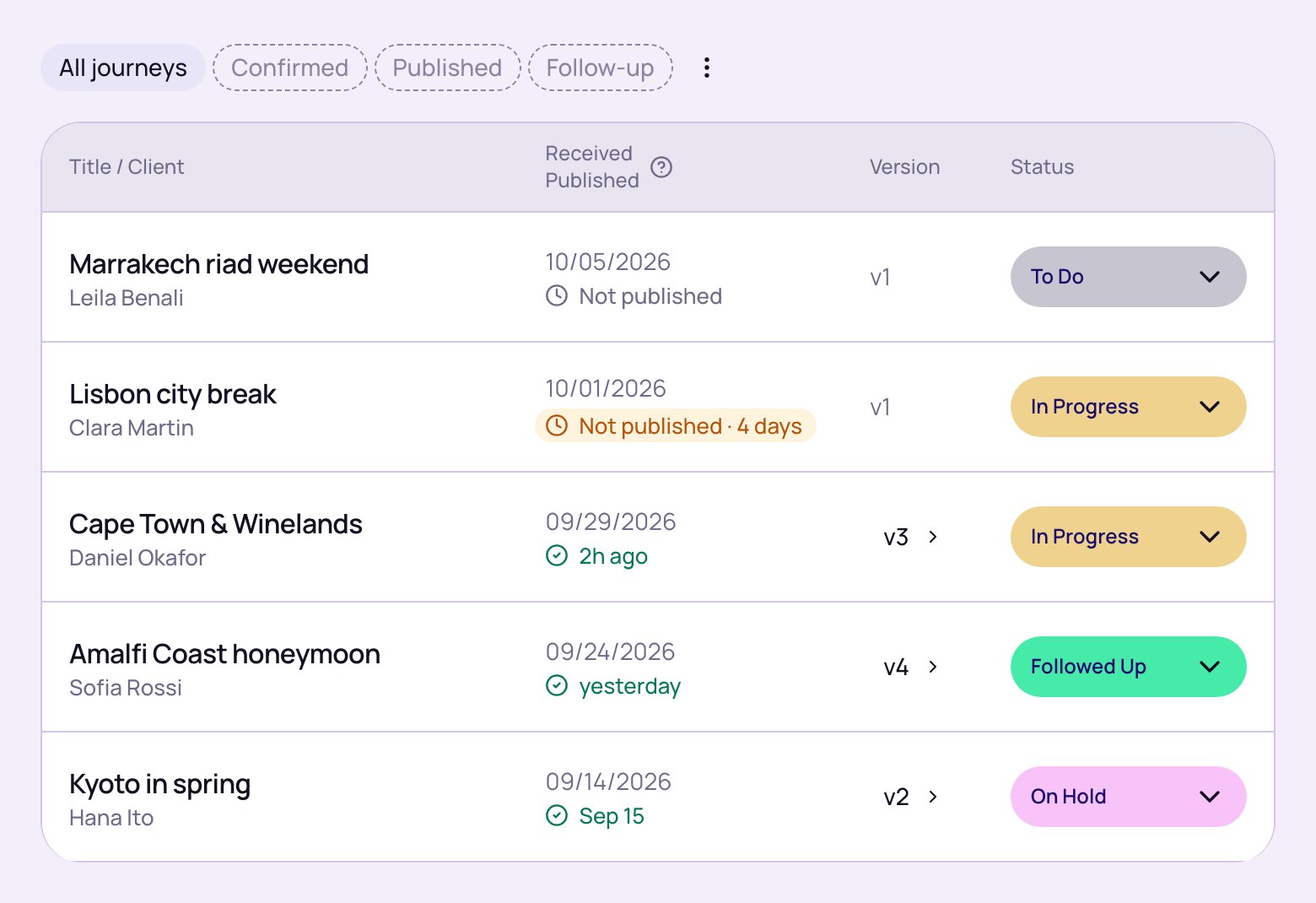
- Open the Published view: It lists published Journeys that are not Confirmed or Not Booked, for trips that have not ended, newest publish first. You can also sort the list by Last published.
- Follow up on In Progress Journeys: Published In Progress Journeys now appear in Follow-up 10 days after their last publish, as On Hold ones do.
- Review past Journeys: If past Journeys still show Published, members who can change Journey statuses see Review Journeys in a banner at the top of Odia. Select it and choose what happened on each trip.
Release notes v0.5.60 ~ 1 October 2026
Release notes v0.5.60 ~ 1 October 2026
What’s New
See when your clients view the Journeys you share. Once a Journey is published, a badge next to its reference tells you whether its links have been viewed.- Check the badge: It shows Not viewed yet until someone opens one of the Journey’s links, then Viewed and how long ago.
- Open Link activity: Select the badge to see the Journey link and each traveler’s share link, how many times each one was viewed, and whether the last view was on mobile or desktop.
- What counts as a view: Each page load counts as one view, not one person. Views by your team aren’t counted.
- New versions start at zero: When you publish a new version, its count starts again and earlier versions keep theirs.
Release notes v0.5.44 ~ 22 September 2026
Release notes v0.5.44 ~ 22 September 2026
What’s New
- Plan with clearer Concierge calendars: Use the new Journeys calendar to see arrivals, departures, and busy days at a glance. Services and Journeys keep consistent status colours, and the calendar stays useful even when there is nothing scheduled.
- Record why a Journey was not booked: Choose a reason when you mark a Journey as Not booked, add details when useful, and correct it later without losing the Journey’s history. Related Journeys in CRM now show the saved reason to your team, while public Journey links keep it private.
- Follow the work on a Journey: The Activity panel in Journey details gives you a timeline of recorded updates, including status, service, email, task, and financial changes. Each event shows what happened, who did it, and when; switch between the overview and the full history, then select Load more for earlier events.
Release notes v0.5.38 ~ 9 September 2026
Release notes v0.5.38 ~ 9 September 2026
What’s New
- Faster, clearer global search: Search from the sidebar now shows results as you type instead of blanking out between keystrokes, groups matches under clear section headings, highlights the words you searched for, and shows result counts on each tab (Journeys, Travelers, Services, Suppliers, and more). Your recent searches appear as soon as you open it.
- A new Help panel for every screen: Open the help icon on any screen to get a focused guide for exactly what you’re looking at, without losing your place. Each panel includes a link to the full Help Centre and a Contact support button that opens support chat right there — no need to dig through a menu to reach us.
- Collapse the sidebar for more room: Use the toggle at the top of the sidebar to shrink the main navigation down to icons only, then expand it again anytime. Your choice is remembered the next time you sign in.
-
Send from your own name and address: Emails Odia sends for you — purchase orders, supplier messages, service reminders, commission requests, Journey emails and invoices — now go out under a sender you choose. In Settings > Communications > Email setup, an organization owner sets a Sender name and a Sender address such as
yourcompany@odia.app, and a live preview shows exactly what the recipient will see. Set the organization’s Reply-to address to a mailbox your team shares, since every reply arrives there; the Email defaults tab can point one email type at a different address.
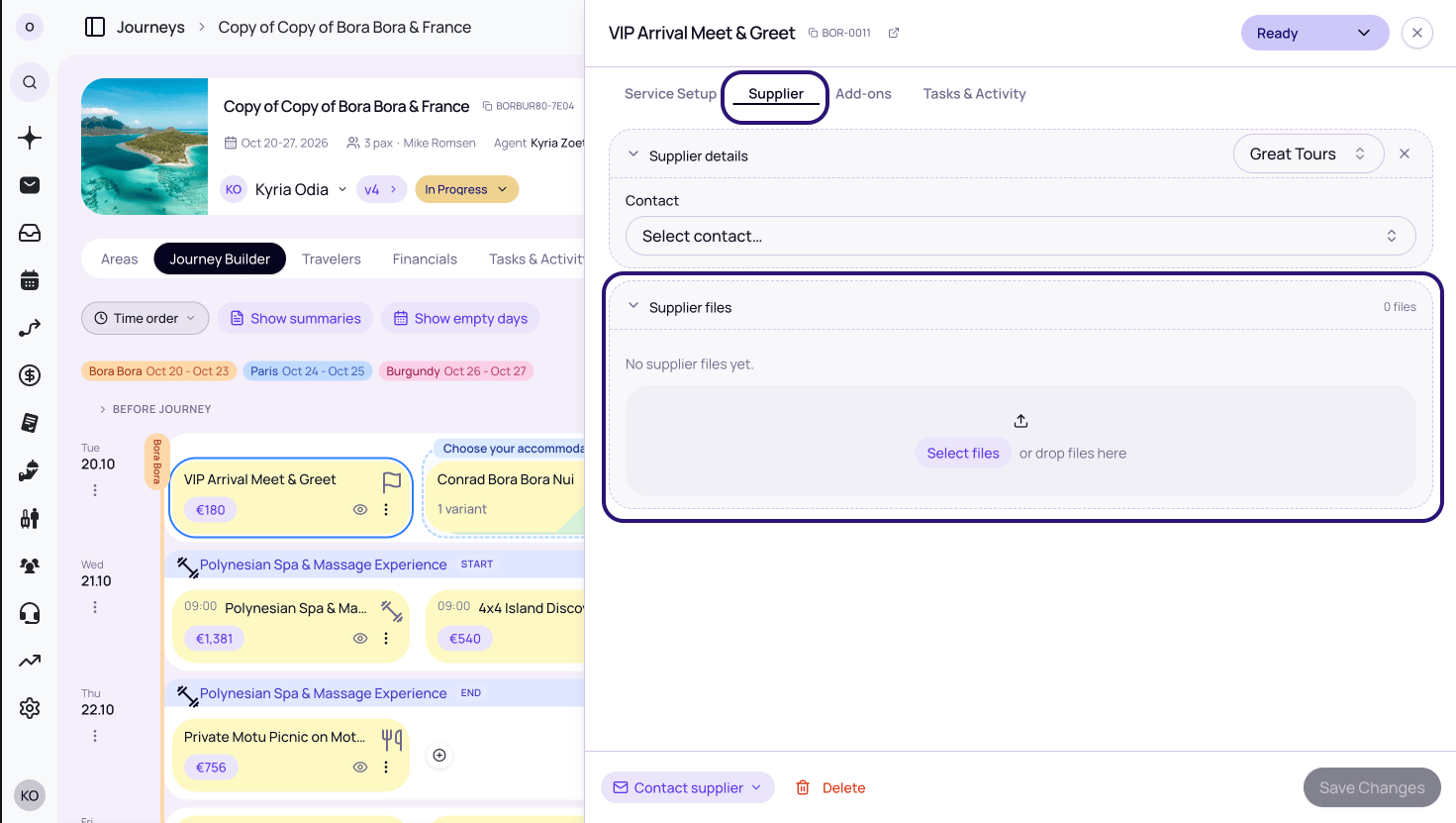
- Upload supplier files directly on a service: The Supplier tab on a service now has its own Supplier files section, so you can attach supplier invoices and other paperwork right where you’re already reviewing supplier pricing. These files are private to your team — they’re separate from the Files on the Service Setup tab, which are visible to the traveler on their web itinerary.
Release notes v0.5.33 ~ 19 August 2026
Release notes v0.5.33 ~ 19 August 2026
What’s New
Share your public Journey links from your own branded address. Instead of the defaultodia.app link, travellers now open Journeys at an address such as yourcompany.odia.app, so they always know the link is coming from you.- Request your subdomain: Owners and organization admins can go to Settings > Organization > General and find Branded public links. Enter the name you want — lowercase letters, numbers, and hyphens only — and select Request subdomain. The request is sent to Odia for review.
- Follow the activation status: While the request is being reviewed, the section shows Configuration in progress. Requests are typically activated within a few hours during business hours. Once approved, the section shows your address as Active.
- Existing links keep working: Any links you shared before approval still open your public Journeys. From activation onwards, every Journey you publish uses your branded link.
- Change it later: To switch to a different name, enter the new subdomain and select Request change. Your current address stays active until the replacement is configured.
yourcompany.odia.app subdomain, not a fully custom domainRelease notes v0.5.21 ~ 23 July 2026
Release notes v0.5.21 ~ 23 July 2026
What’s New
- Reuse services as templates or bundles: Save a repeatable set of services in the Library. Templates add editable services to a Journey, while bundles keep them together and present one polished package card to the client.
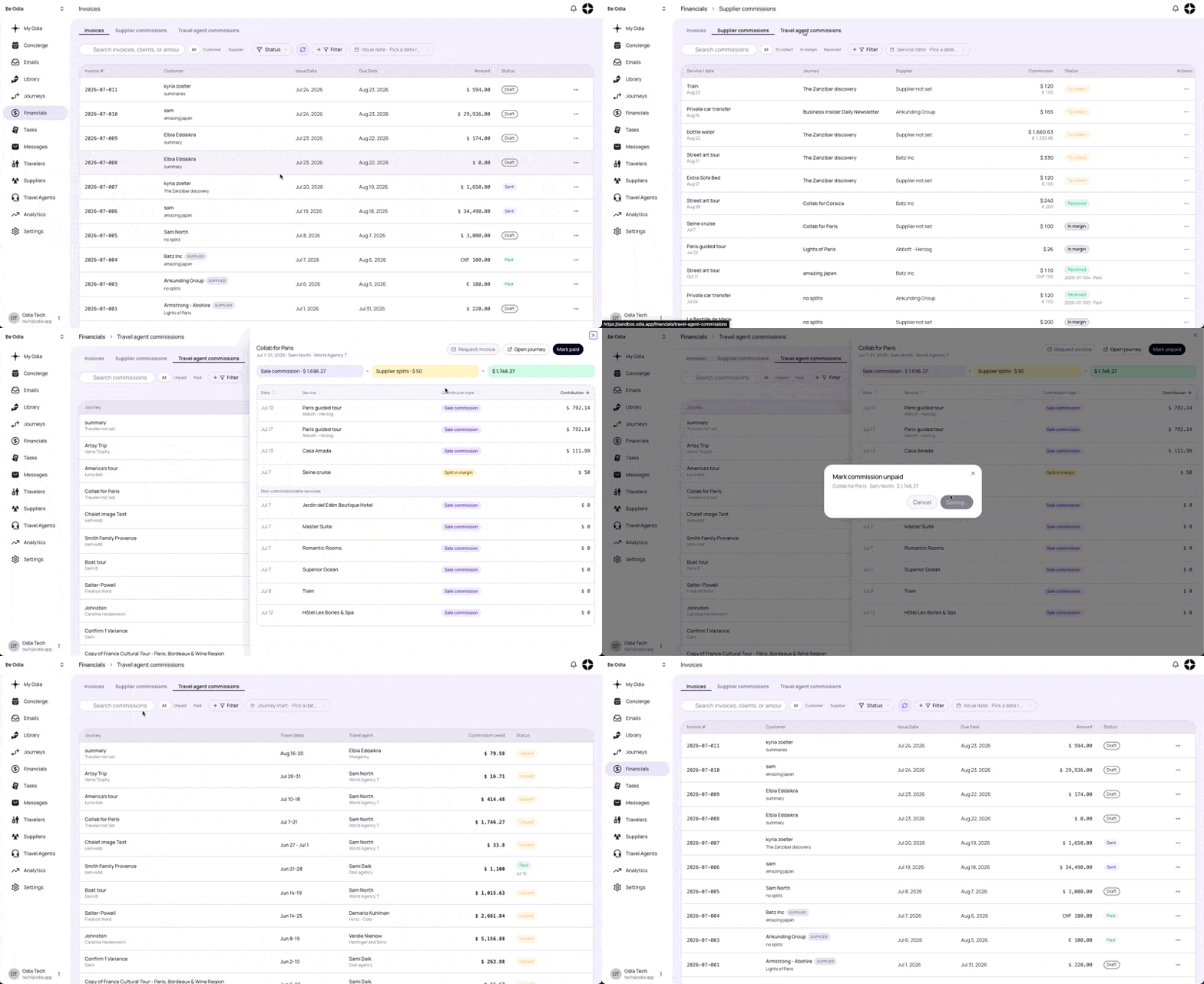
- Manage all finances from one place: The main Invoices menu is now Financials—a central hub for invoices, supplier commissions, and travel-agent commissions. Search and filter each section, manage supplier commissions, and open or mark travel-agent commissions as paid.
- Choose payment instructions for each invoice: Save up to ten payment instruction profiles in Invoice Settings, set a default, and select the right instructions for each draft. The selected wording is preserved when the invoice is issued and appears on the public invoice and PDF.
- Manage service variants more easily: Use the new Variants tab in the Journey Builder to review active, hidden, or removed variants and add a removed variant back when plans change.
- Set default add-ons in the Library: Choose and order default add-ons on a Library service. Whenever that service is added to a Journey, its default add-ons are added automatically.
- Assign services to more than one area: Select every area where a Library service is available, then use the area filter to find services across any of the selected locations.
- Filter travel agencies by your custom fields: Use visible multi-option fields to narrow the Agencies list. Active filters stay visible as chips so you can adjust or clear them quickly.
Release notes v0.5.14 ~ 10 July 2026
Release notes v0.5.14 ~ 10 July 2026
What’s New
Build the content of your Journey in one place. Content cards and summaries have moved from Overview into the Journey Builder, alongside your services.- Place content cards anywhere: Add content cards directly in the Journey Builder and arrange them between services in any order.
- Add multiple intro and closing cards: Use the Before journey and After journey sections to add as many welcome notes, travel information, or closing messages as you need.
- Create summaries in the builder: Write or edit the proposal summary and each daily summary without leaving the Journey Builder. You can also use Odi AI to generate them for you.
- Reuse Marked-up pricing for collected supplier commission: When a supplier commission is Collected, select Use pricing from Marked-up to keep the service’s existing cost, basket, markup, and selling price while tracking the supplier commission separately. You can return to Marked-up to adjust that pricing, then return to Supplier commission without removing Collected tracking.
Track supplier commissions
When a supplier owes you commission, Odia now keeps the terms, amount, any travel-agent share, and collection status together on the Journey. This replaces separate spreadsheets or reminders with a clear record of what you have earned and what is still outstanding.Add commission to a service
- Open the Journey’s Financials tab and edit the relevant service price.
- Choose the arrangement that applies:
- Supplier commission: you pay the supplier and earn commission from them.
- Client-direct: the traveller pays the supplier directly, while you track the commission the supplier owes you.
- Enter the supplier commission as a percentage or fixed amount. You can also exclude any non-commissionable charges.
- For Supplier commission, choose how it will be settled:
- Netted: the commission is deducted from what you pay the supplier and is already In margin.
- Collected: you pay the supplier in full and collect the commission later. It starts as To collect.
- If a travel agent is linked to the Journey, select Split with travel agent:
- For a percentage commission, split the supplier’s rate into % agent and % you. For example, split a 20% supplier commission equally by entering 10 in % agent; % you becomes 10.
- For a fixed commission, enter the currency amount the agent receives.
- Select Save Pricing.
See what is earned and still owed
Open the Supplier commission card in Financials to see each service’s terms, commission amount, travel-agent split, and status:Release notes v0.5.8 ~ 5 July 2026
Release notes v0.5.8 ~ 5 July 2026
What’s New
- Default addresses for services: Add a default address to a library service so it carries through when the service is added to a Journey. Variants without their own address now inherit the parent service address.
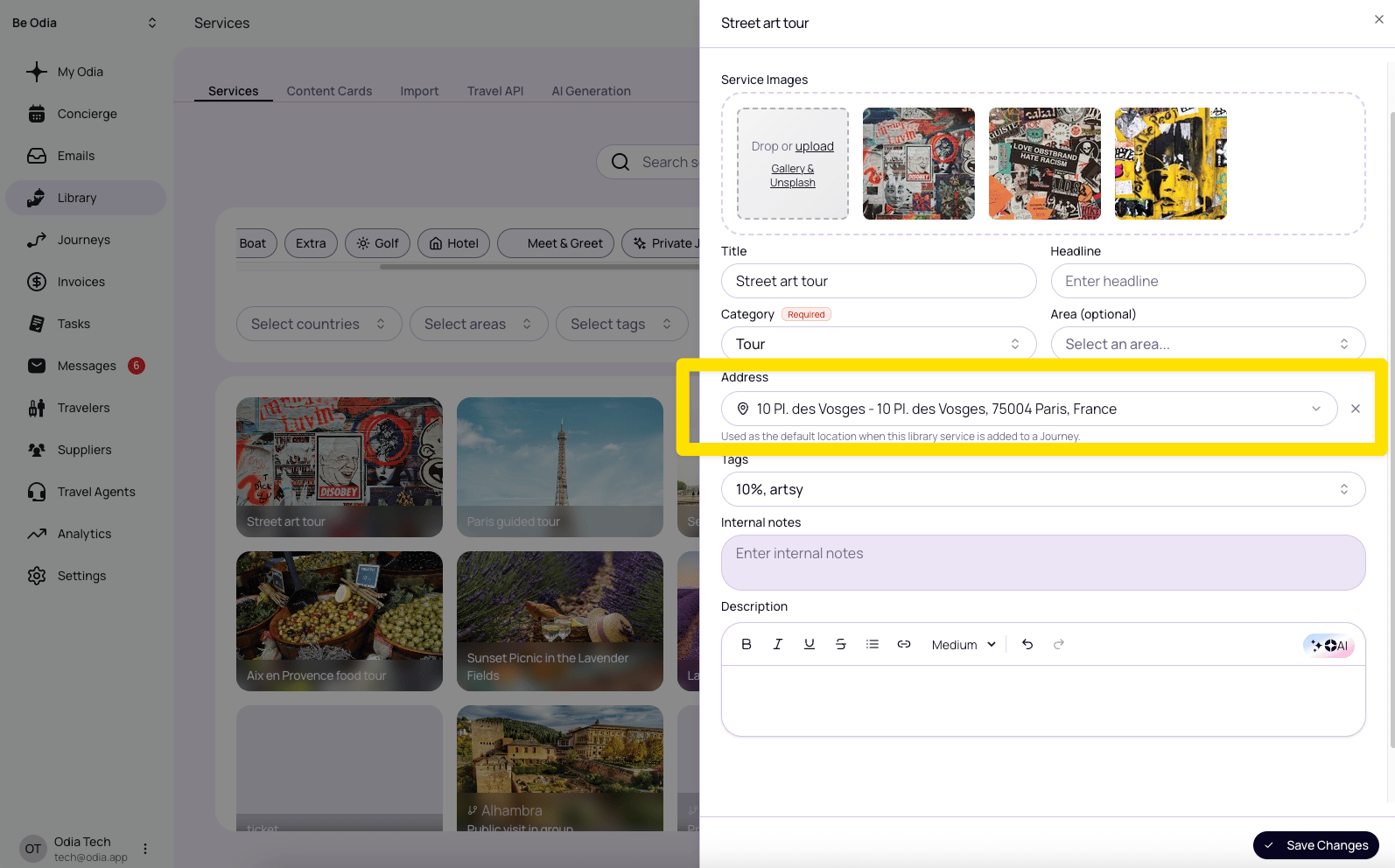
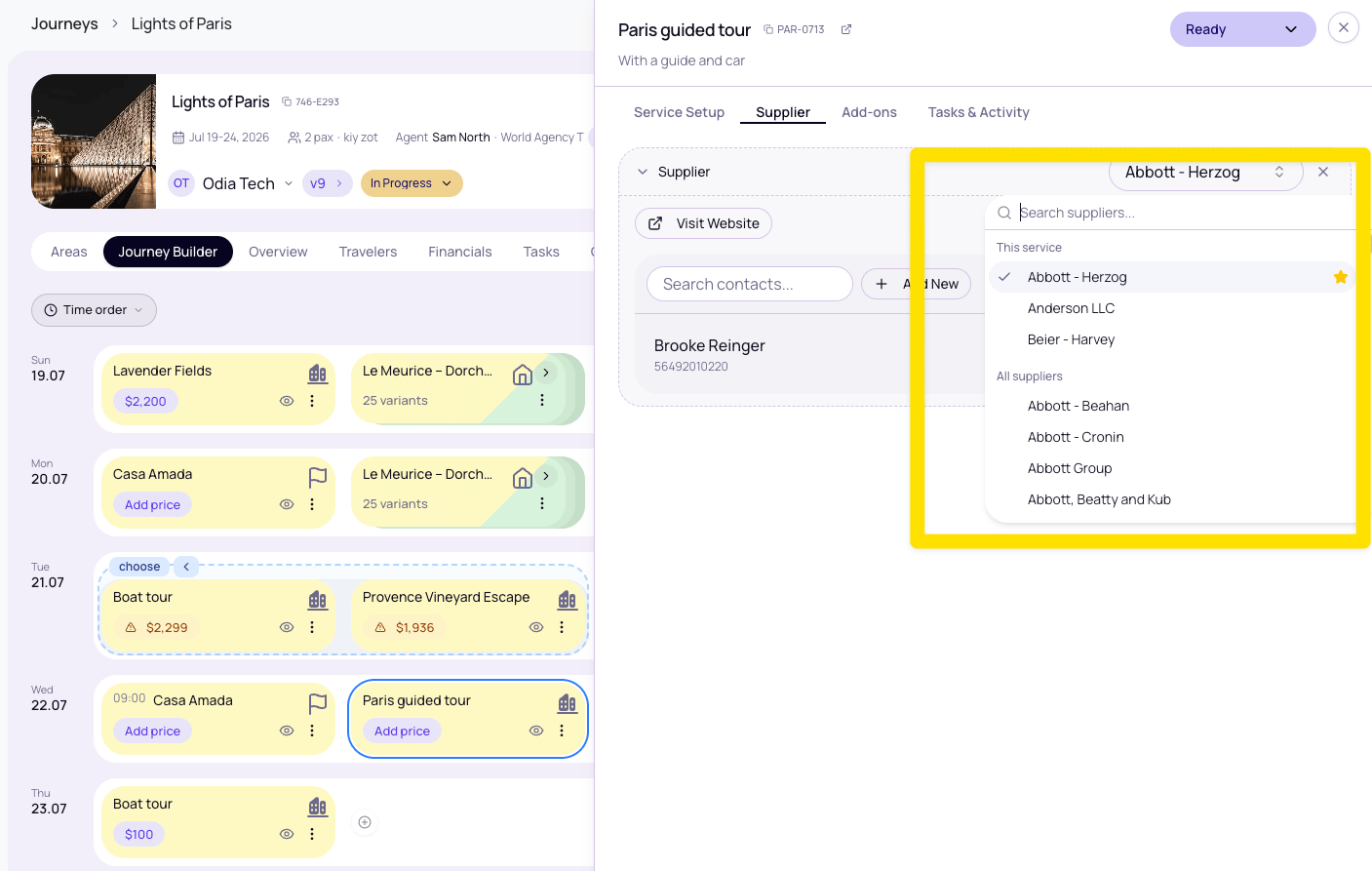
- Service-linked suppliers first: When choosing a supplier for a Journey service, suppliers already linked to that library service now appear at the top, with the preferred supplier starred.
Release notes v0.5.0 ~ Financials
Release notes v0.5.0 ~ Financials
What’s New
The new Financials tab brings pricing and invoices together in one shared list, so you can manage the money side of a Journey without switching between separate tabs.- One shared list for services: What used to live across Pricing and Invoices is now grouped under Financials, with services shown together in one table.
- Sort by any column: Use the column headers to sort the Financials list by the information that matters most for the task in front of you.
- Clickable KPI cards: Each KPI card at the top of the tab can be clicked to focus the list on the services and columns behind that number.
- Select services before creating outputs: Use the new checkboxes to pre-select exactly which services you want to include, then create an invoice or generate a public quote link from only those selected services.
Release notes v0.4.8 ~ 12 June 2026
Release notes v0.4.8 ~ 12 June 2026
What’s New
- Combine filters on the Concierge screen: A new Filter button lets you narrow down by Status, Owner, Category, Supplier, and Traveler — stack as many as you need. Within a filter you can select multiple values, and each additional filter narrows further. Active filters show as chips next to the button — remove one with × or hit Clear all.
- Sort the Concierge list: In list view, use Order by to sort by Time, Client, Message status, or Supplier, ascending or descending. Sorting by Message status brings everything still unsent to the top.
-
Customize your sidebar: Go to your account menu and choose Customize sidebar to reorder items, and set each to Always show, Show when badged, or Don’t show. My Odia and Settings are fixed in place.
 Your layout is saved to the browser you set it in, so you’ll need to set it up separately on each device for now.
 - One-off services on a Journey: Need a service for just one trip? Click New service + when adding services to a Journey, give it a title and category, and it goes straight onto the Journey without touching your Library. If you decide you’ll reuse it, tick Save in library before adding.
-
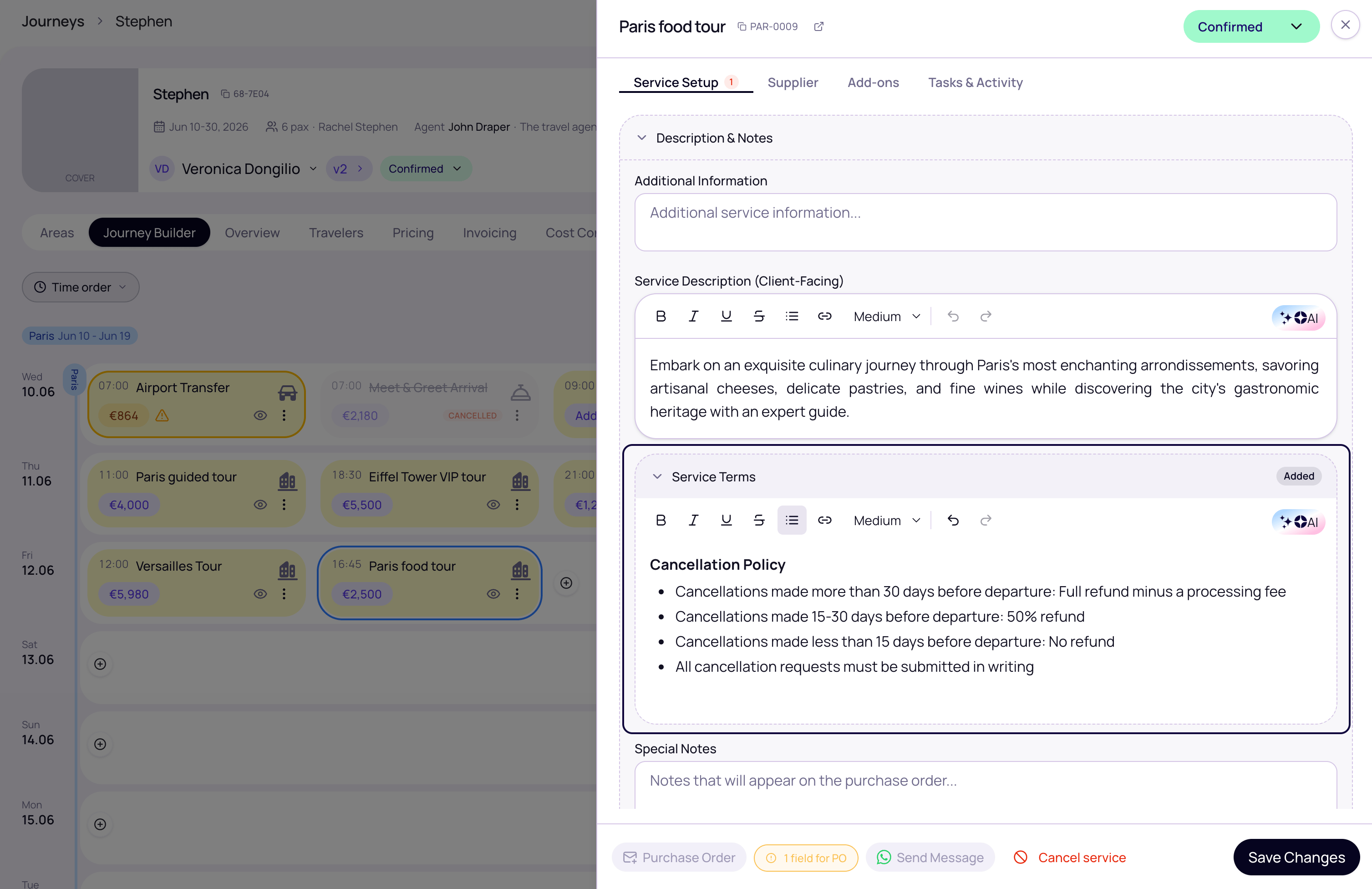
Terms & Conditions on services: Attach T&C to any service in your Library using the Default Trip Service Terms field, just below the description. When you add that service to a Journey, the terms come with it and can be edited per trip without touching the original in your Library.
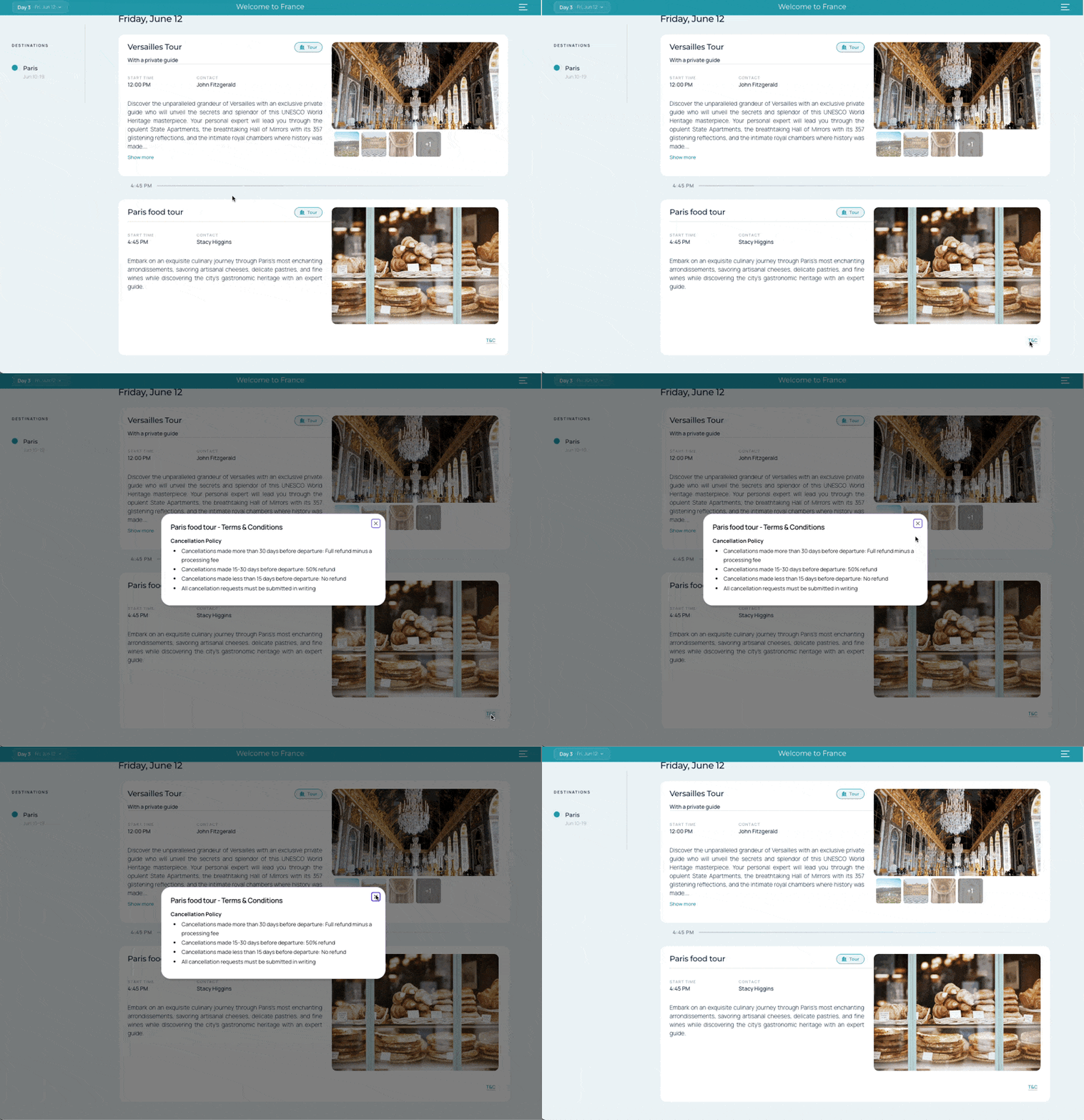
On the public Journey, travellers see a small T&C link on the service card — it opens the full terms in a dialog, so the detail is there without cluttering the view.
Release notes v0.4.0 ~ Journey unification
Release notes v0.4.0 ~ Journey unification
The core change
Proposals and itineraries are now a single Journey. There is no longer a separate itinerary that gets created when a trip is confirmed — the same Journey you built as a proposal becomes the operational record. Everything else in this release builds on that foundation.What’s New
- One Journey from proposal to operations: A confirmed trip stays editable in the same place. Add service details, update logistics, or make last-minute changes without switching to a different record.
- Service details at any stage: Start times, location, and supplier contacts can be filled in on any Journey — not just after confirmation. Open a service, fill in the details, and they appear on the public link the next time you publish.
-
Publish controls what travellers see: Saving a change inside Odia does not update the public link automatically. The publish indicator in the Journey header shows one of three states:
When you publish you can optionally add a description to record what changed in that snapshot. This applies to both proposals and confirmed trips.
- Confirming a trip publishes it automatically: When you set a Journey to Confirmed, Odia automatically publishes the current snapshot so travellers see the confirmed version straight away. A toast confirms this has happened.
-
Three journey views: The Journeys screen now has three tab views at the top:
Use the ⋯ menu next to the tabs to set a default view that persists across sessions.
- Copy link to current view: The same ⋯ menu also has a Copy link to view option that copies a direct URL to whichever tab you’re on — useful for sharing a filtered view with a colleague.
- Private preview: The eye icon in the Journey header opens a private preview of the current draft state — exactly what you would publish — without making it live. Use this to review a Journey before publishing.
- Cancelled services section: In the list view, cancelled services are grouped into a separate Cancelled services section at the bottom of the Journey, keeping the active itinerary clean.
Also in this release
- One shared link throughout: The public Journey URL does not change when a trip moves from proposal to confirmed. Any link you have already shared continues to work. You can also disable the public link entirely for a specific Journey using the Disable Public Link toggle on the Settings tab of the Edit Journey dialog.
- Simplified status labels: The Part confirmed status is no longer available on new or updated Journeys. The two confirmed states are now Accepted (client has accepted the quote, payment or final confirmation still pending — set manually by the agent) and Confirmed (trip is operationally confirmed). The Sent status is now labelled Published in the status selector to align with the new publish-first language.
-
Legacy URLs redirect automatically: Existing
/proposalsand/itinerarieslinks redirect to the new/journeysURLs, so any bookmarks or shared links continue to work without any action needed.
Release notes v0.3.37 ~ 14 May 2026
Release notes v0.3.37 ~ 14 May 2026
What’s New
-
Collapsible Option Groups in the Journey Builder: Option groups in the Board View of Journeys can now be collapsed. Click the chevron (←) button next to the group name to fold the entire group into a single stacked card. Click it again to expand.
Why this matters: Previously, an expanded options group was a fixed block you couldn’t easily move — and services couldn’t be dragged past it or repositioned relative to it. Collapsing the group turns it into a single draggable unit, so you can:
- Reorder it within the day alongside other services
- Move it to a different day by dragging the collapsed card to another date column
- Move other services around it without the group getting in the way
- Smarter Drop Behaviour Near Option Groups: Dropping a service inside an expanded group’s area no longer bounces back with an error. The service now automatically snaps to the nearest position outside the group instead.
Release notes v0.3.34 ~ 12 May 2026
Release notes v0.3.34 ~ 12 May 2026
What’s New
-
Redesigned Pricing Dialog: The pricing dialog has been rebuilt from the ground up. When you open pricing for any service, you now see a clean two-section layout — enter your cost, then let the formula calculate the selling price for you. If you have markups configured, the dialog shows a live step-by-step breakdown of exactly how your cost becomes the final price (exchange rate conversion, markup, and commission all laid out in sequence). Your real-time margin is displayed alongside the selling price so you always know your profitability at a glance.
Key controls in the new dialog:
Price drift warning: If a service’s saved price no longer matches what your current markup formula would calculate (for example after you changed your markup settings), a banner appears showing both numbers. You can choose to update to the formula price or keep your existing override — nothing changes silently.
- Unpriced Services Warning on the Pricing Tab: Services that have no selling price set are now highlighted on the Pricing tab with a warning indicator so you can quickly spot and complete missing pricing before sending a proposal.
Setting Up Your Markups
Markups are what tell Odia how to calculate a selling price from a supplier cost. They are not new, but with the redesigned dialog they are more central to day-to-day pricing.To create or manage your markups:Open Pricing Rules
Add a markup
Set a default
Category-specific markups (optional)
- Markup selected in the pricing dialog for an individual service
- Category default markup
- Global default markup
Release notes v0.3.23 ~ 29 April 2026
Release notes v0.3.23 ~ 29 April 2026
What’s New
- Variants: Services can now have variants — different versions of the same service that let your client choose between options. Add variants to any service in the library (e.g. “Deluxe Room”, “Suite”, “Villa” — or “Standard Tour”, “Premium Tour”). On the proposal the client sees all options as a selector and can pick the one they want, with the price updating to match their choice.
- Add-ons: You can now attach optional extras to any service on a proposal. Open the Add-ons tab on a service, pick from your library (or create a new service inline), and it appears below the service card as an opt-in checkbox with its own price. Clients can toggle each add-on on or off — only selected add-ons are included in the total. Nothing is ticked by default, so clients choose what they want.
- Variants in the Service Library: Variants now show their parent service name in the library so you can find and identify them easily when searching.
Release notes v0.3.22 ~ 27 April 2026
Release notes v0.3.22 ~ 27 April 2026
What’s New
- Service Options: You can now offer your client a choice between alternative services on the same Journey. Hold Command (Mac) or Ctrl (Windows) and click the services you want to group, then select Options from the bar that appears. Give the group a name (e.g. “Accommodation Choices”) and save — or press Enter without a name and it will display as “Suggested options” on the public Journey. Your client sees the options as tabs and can switch between them — only the selected option counts toward the total price. This is ideal for presenting two or three hotel alternatives, completely different tours, or any situation where the client needs to pick one path.
- New Proposal Creation Page: Creating a proposal is now a full-page experience with dedicated tabs instead of a compact dialog. The tabs walk you through every aspect of the proposal — general details, destinations and areas, travel agent and commission, traveller information, and display settings — all in one place before you start building the itinerary.
Release notes v0.3.15 ~ 16 April 2026
Release notes v0.3.15 ~ 16 April 2026
What’s New
- Cover Image Viewport Control: You can now decide exactly how your cover image appears on the public Journey. In the preview, open the crop tool to drag the image to the perfect position. Choose between Fill (image fills the full space, cropped to fit) or Fit (full image shown with a soft blurred background). You can also adjust the zoom in Fit mode. Save your setting once per image and it carries through to all proposals automatically.
- Service Card Image Cropping: The same crop control is now available on individual service cards too. Click the crop button on any service card image inside the Journey Designer to fine-tune how each photo is framed — without changing the original file.
Improvements
- Layout fixes across all Journey Designer layouts (Flow, Timeline, Magazine, Split, Condensed) for a more consistent look on all screen sizes.
Release notes v0.3 ~ 06 April 2026
Release notes v0.3 ~ 06 April 2026
What’s New
-
Journey Designer: You can now edit the layout and appearance of your public Journey directly from the Odia screen. Choose from five layouts — Flow, Timeline, Magazine, Split, and Condensed — customise individual service card styles, and control what information your client sees (prices, map, day summaries, branding, and more). Access it via the eye button on any Journey to open the preview with the full designer toolbar.
The public link button opens the latest published Journey link.
Available layouts:
- Flow — Classic vertical scroll, works with all card styles. Great for most proposals.
- Timeline — Left-aligned time rail with a vertical connector line. Shows start times prominently. Best for timed itineraries.
- Magazine — Full-screen, page-by-page experience. Best for luxury trips with strong photography.
- Split — Compact day list on the left, service detail panel on the right.
- Condensed — Maximum information density with no large images. Great for agent review.
Journey Designer
- Area Timeline: A new visual editor in the Areas tab of any proposal. Map out which geographic areas the trip covers and for how many days before adding services. Reorder legs and Odia will automatically shift the dates of all services within that leg to match. Ideal for multi-destination trips.
Area Timeline
-
Redesigned Itinerary Service Details: The service detail panel in itineraries has been reorganised from individual tabs into three top-level tabs with collapsible sections, making it easier to find what you need and keeping the panel less cluttered.
The most commonly used sections (Dates & Times, Travelers, Supplier, Pricing, Files, Tasks) open by default. Less frequently used sections (Location, Description & Notes, Custom Fields, Communications) are collapsed but expand with a single click.
-
Service Ordering Toggle: A new control next to the Services tab lets you choose how services are ordered within each day of your Journey. Two modes are available:
Important notes:
- This setting is saved per Journey and affects the public Journey your travelers see — it is not just a local view preference.
- The toggle is visible in both List and Board views.
- When in Start time mode, dragging a service on the Board may automatically adjust its start time to match the surrounding services. This is expected behaviour — the system keeps times consistent with the visual order.
- Switching from Start time to Manual preserves the current visual order as your starting point.
- Start times are now displayed directly on service cards in the Board view when set.
Release notes v0.1.43 ~ 27 February 2026
Release notes v0.1.43 ~ 27 February 2026
What’s New
-
Duplicate Journeys: Quickly create new Journeys based on existing ones. Click the three dots menu on any Journey and select Duplicate Journey to create a copy with the same settings, including all services. Perfect for template-style Journeys or when creating similar trips for different dates or travellers.
What gets copied:
- Title (prefixed with “Copy of”)
- Travel dates (from/to)
- Content cards
- Day summaries
- Description/summary
- Areas/destinations
- Guest count
- Commission percentage
- Travel agent
- Headline
- Cover image
- Display settings (hide prices, hide branding, show total only)
- All services (with their prices and details)
- Travelers
- Primary traveler
- Status: becomes TO DO
- Owner (defaults to current user)
-
Assign Travelers to Services: You can now assign specific travelers to individual services. When editing a service, go to the Travelers tab to select which travelers are participating in that activity. Travelers are shown by their first and last name for clear identification. This is perfect for family trips where not everyone joins every activity, or group tours with optional excursions.
How it works:
- Open a service and navigate to the Travelers tab
- Select travelers using the checkboxes—each traveler is shown with their full name
- The guest count automatically updates based on your selection
- Clear your selection to return to manual guest count entry
Learn More About Duplicating Journeys
Release notes v0.1.41 ~ 02 February 2026
Release notes v0.1.41 ~ 02 February 2026
What’s New
- Multi-Day Service Support: Services can now span across multiple days in your Journey. Within Odia’s internal view, a visual banner indicates when a service extends beyond a single day, making it easier to plan accommodations and multi-day activities. (Note: For now the visual banner appears in Odia only, not in public Journeys.)
- Traveler Age Display: Traveler cards now show each traveler’s age alongside their details, making it quicker to identify age-appropriate services and requirements at a glance.
- Invoice Line Item Defaults: Configure default descriptions for invoice line items in your organization settings. New line items will automatically populate with your preferred description text.
- Smart Invoice Status: Invoice status now reflects the actual payment situation more accurately. The system considers payment amounts and due dates to show whether an invoice is paid, partially paid, overdue, or pending.
- Purchase Order Reminder Fields: Choose which fields to include when sending purchase order reminders. Configure this in your reminder settings to ensure suppliers receive the information they need.
Improvements
- Faster Tab Loading: The Invoices tab now load significantly faster with improved server-side data fetching.
- Smoother Scrolling: Infinite scroll in lists has been optimized for a smoother browsing experience.
Bug Fixes
- Fixed an issue where invoice numbers could display incorrectly in certain views.
- Fixed currency formatting inconsistencies on invoices.
- Fixed itinerary status counts not reflecting the correct totals in the listing view.
Release notes v0.1.37 ~ 27 January 2026
Release notes v0.1.37 ~ 27 January 2026
What’s New
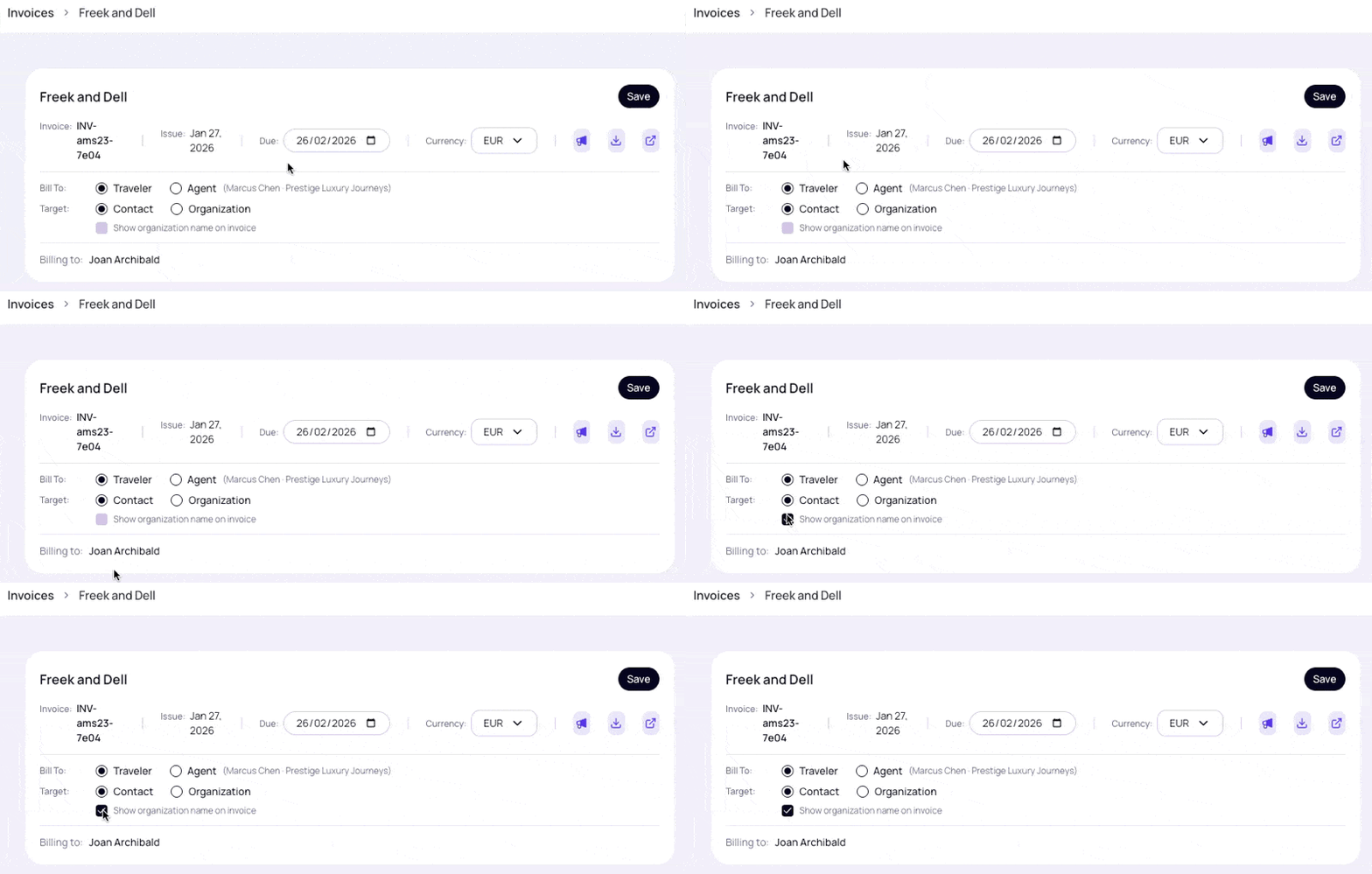
- Show/Hide Organization on Invoices: When a billing contact is linked to an organization, you can now toggle whether the organization name appears on the invoice. Use the new switch in the invoice editor to control this display for both the PDF export and the public invoice view.
Bug Fixes
- Fixed an issue where the organization name setting was not saved correctly on invoices.
Additional release notes v0.1.27
Additional release notes v0.1.27
Adding Maps to Journeys
You can now add interactive maps to your Journeys that display the locations your travellers are visiting. The map appears on the overview page and automatically shows destinations based on the areas assigned to your services.Learn How to Add Maps
Release notes v0.1.27 ~ 21 January 2026
Release notes v0.1.27 ~ 21 January 2026
What’s New
- Invoice Currency Selector: Choose the display currency for your invoice totals. The system automatically detects and defaults to the common currency when all services share the same selling currency. Override anytime using the currency dropdown in the invoice header. The selected currency is applied to the invoice total, PDF export, and public invoice view.
-
WhatsApp Message Customization: Organizations using the WhatsApp integration can now customize their default duty messages. Go to Settings → Communications → WhatsApp to configure your intro message, closing message, and default recipient type. Use
{{RECIPIENT_NAME}}in your intro to automatically insert the recipient’s name. A live preview shows exactly how your message will appear.
Release notes v0.1.19 ~ 17 January 2026
Release notes v0.1.19 ~ 17 January 2026
What’s New
- Content Cards: Add any information your travellers need that isn’t a service. Perfect for local tips, cultural insights, safety information, packing lists, and more. Content cards give you the flexibility to include important context that helps travellers prepare for their journey.
- AI-Generated Proposal Summaries: Save hours of writing time by letting AI create compelling overviews of your travel proposals. Generate professional, engaging summaries that capture the essence of each trip. The AI analyzes all services and journey details to craft a cohesive narrative that resonates with travellers.
- AI-Generated Day Summaries: Create clear, engaging summaries for each day of the itinerary automatically. Perfect for giving travellers a quick overview of what to expect each day without reading through all service details.
- Renewed Odi AI Service Descriptions: Enhanced AI-generated descriptions for all your services. The AI now creates more compelling, contextual descriptions that better showcase your offerings.
- Summary Visibility Controls: Choose whether to show or hide the summary section on public Journeys. Perfect for when you want to keep things simple or add a personal touch.
- Archive Journeys: Keep your workspace tidy by archiving completed or cancelled Journeys. Archived Journeys remain accessible but no longer clutter your active proposals list.
- AI Credits System: All AI-powered features now use AI credits from your account balance. The system shows you the estimated cost before generating content, with live progress tracking and the ability to cancel generation at any time.